
Before you begin
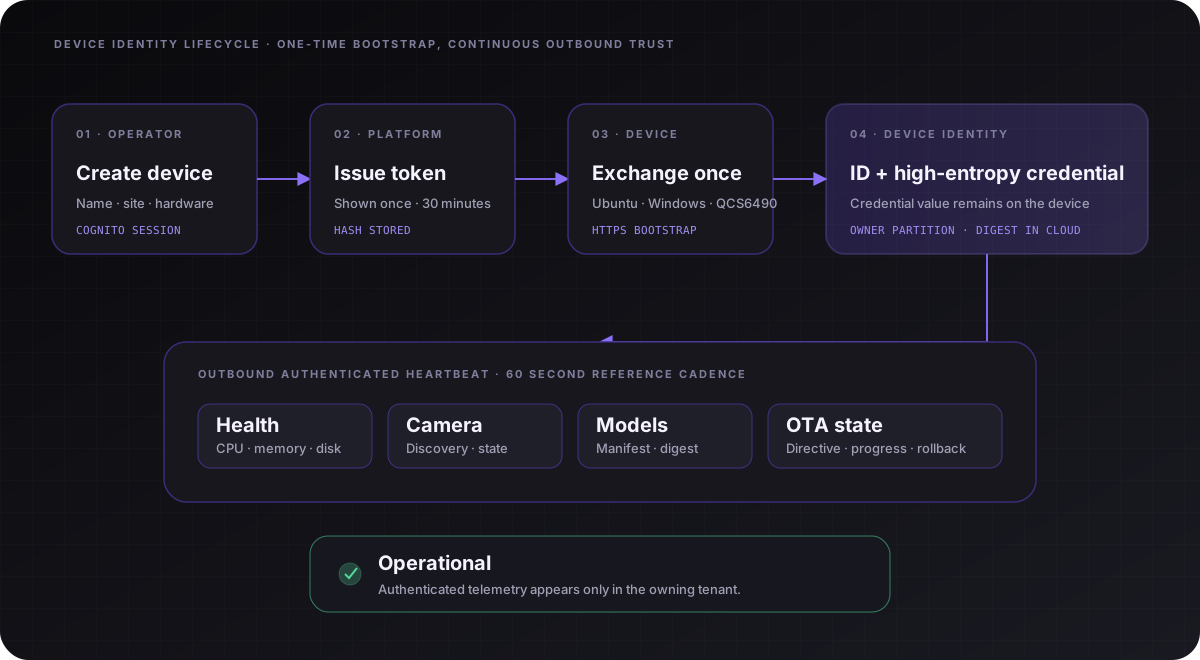
You need an Oddessy Platform invitation and a supported Windows or edge-capable Linux node. Linux targets include Jetson, QCS6490, Raspberry Pi 5, generic ARM64/x86_64 and Yocto-capable product images. The enrolment token is shown once and expires after 30 minutes.
Open platform.oddessy.io and choose Request a platform invite. The structured request captures company size, intended deployment, systems and region, then appears in the reviewed Oddessy admin inbox.
1. Install the runtime
Windows
Download the approved x64 MSI from Releases. It installs the machine-wide OddessyEdge service and stores configuration under C:\ProgramData\Oddessy\Edge.
Linux / Yocto-capable edge runtime
Create the device in Platform, then use the reviewed provisioning path supplied for your pilot. The npm command below is the intended registry interface; @oddessy-io/cli remains a release candidate pending publication. It requests a 15-minute signed release, verifies SHA-256 before installation, enrols the host and starts the service. Leave hardware_profile set to auto, then confirm the detected target and model-scope status in telemetry.
sudo npx --yes @oddessy-io/cli provision --platform https://platform.oddessy.io --token "$ODDESSY_ENROLMENT_TOKEN" --install2. Create the enrolment
- Open Devices and choose Add device.
- Enter a descriptive name, physical location and hardware type.
- Copy the one-time command and run it with the required administrator privileges.
- Confirm the device reports Operational and inspect its model-provenance state.
3. Verify locally
# Ubuntu
sudo oddessy-edge status
sudo oddessy-edge telemetry

# Windows PowerShell
Get-Service OddessyEdge
& "$env:ProgramFiles\Oddessy\Edge\oddessy-edge.exe" status
& "$env:ProgramFiles\Oddessy\Edge\oddessy-edge.exe" telemetry
Compact Linux / Yocto vision
Where a VLM is unnecessarily large, install OpenCV in the target image and use oddessy-classical-vision for local Canny edges, contours, baseline motion or a compact ONNX classifier through OpenCV DNN. Results remain advisory and behind the same PLC/safety boundary.